import tkinter as tk
from tkinter import colorchooser, filedialog, messagebox, simpledialog, ttk
from PIL import Image, ImageDraw, ImageFont, ImageTk, ImageEnhance
import os

class TozsunStudio:
    def __init__(self, root):
        self.root = root
        self.root.title("Tozsun Studio - Final Stable")
        self.canvas_width, self.canvas_height = 900, 650
        self.root.geometry(f"{self.canvas_width + 300}x{self.canvas_height + 100}")

        self.clip_dir = "clips"
        if not os.path.exists(self.clip_dir): os.makedirs(self.clip_dir)

        # 状態管理
        self.color, self.bg_color, self.brush_size, self.tool = "black", "white", 5, "pen"
        self.image_area, self.current_file_path, self.clipboard_img = None, None, None
        self.pasting_image, self.pasting_x, self.pasting_y, self.drag_start_pasting = None, 0, 0, None
        self.text_widget, self.font_name = None, "Arial"
        self.history, self.redo_history, self.max_history = [], [], 20

        # 初期キャンバス
        self.image = Image.new("RGB", (self.canvas_width, self.canvas_height), self.bg_color)
        self.draw = ImageDraw.Draw(self.image)
        self.font_path = self.find_japanese_font()

        self.setup_ui()
        self.update_display_name("新規キャンバス")
        self.setup_shortcuts()
        self.save_state()
        self.redraw_canvas()

    def find_japanese_font(self):
        paths = ["/usr/share/fonts/opentype/noto/NotoSansCJK-Regular.ttc",
                 "/usr/share/fonts/truetype/noto/NotoSansCJK-Regular.ttc",
                 "/usr/share/fonts/truetype/fonts-japanese-gothic.ttf",
                 "C:/Windows/Fonts/meiryo.ttc", "C:/Windows/Fonts/msgothic.ttc"]
        for p in paths:
            if os.path.exists(p): return p
        return None

    def setup_shortcuts(self):
        self.root.bind("<Control-z>", lambda e: self.undo_state())
        self.root.bind("<Control-y>", lambda e: self.redo_state())
        self.root.bind("<Control-s>", lambda e: self.overwrite_save())

    def update_display_name(self, name):
        self.root.title(f"Tozsun Studio - {name}")
        self.filename_label.config(text=f"編集中のファイル: {name}")

    def create_modern_button(self, parent, text, command, bg="#34495e", fg="white", hover="#4e6d8d"):
        btn = tk.Button(parent, text=text, command=command, bg=bg, fg=fg, relief="flat", bd=0, font=("Meiryo UI", 9), cursor="hand2")
        btn.bind("<Enter>", lambda e: btn.config(bg=hover))
        btn.bind("<Leave>", lambda e: btn.config(bg=bg))
        btn.pack(fill="x", padx=10, pady=2)
        return btn

    def setup_ui(self):
        top = tk.Frame(self.root, bg="#34495e", height=55); top.pack(side="top", fill="x"); top.pack_propagate(0)

        b_frame = tk.LabelFrame(top, text="ブラシ・フォント", bg="#34495e", fg="#bdc3c7", font=("Meiryo UI", 8))
        b_frame.pack(side="left", padx=10, pady=5, fill="y")
        self.size_spin = tk.Spinbox(b_frame, from_=1, to=100, width=5)
        self.size_spin.delete(0, "end"); self.size_spin.insert(0, "5"); self.size_spin.pack(side="left", padx=5)
        self.color_btn = tk.Button(b_frame, text="■ 色", bg=self.color, fg="white", command=self.choose_color)
        self.color_btn.pack(side="left", padx=5)

        adjust = tk.LabelFrame(top, text="画像調整 (重ねる時の倍率)", bg="#34495e", fg="#bdc3c7", font=("Meiryo UI", 8))
        adjust.pack(side="left", padx=10, pady=5, fill="y")
        self.scale_slider = tk.Scale(adjust, from_=10, to=200, orient="horizontal", bg="#34495e", fg="white", length=120); self.scale_slider.set(100); self.scale_slider.pack(side="left")

        main = tk.Frame(self.root); main.pack(expand=True, fill="both")
        l_bar = tk.Frame(main, width=120, bg="#2c3e50"); l_bar.pack(side="left", fill="y"); l_bar.pack_propagate(0)
        tk.Label(l_bar, text="TOOLS", bg="#2c3e50", fg="#bdc3c7", font=("Arial", 8, "bold"), pady=10).pack()
        tools = [("自由線", "pen"), ("直線", "line"), ("消しゴム", "eraser"), ("四角形", "rect"), ("円形", "oval"),
                 ("塗りつぶし", "fill"), ("テキスト", "text"), ("スポイト", "picker"), ("範囲コピー", "copy_select"), ("貼り付け", "paste")]
        for t, n in tools: self.create_modern_button(l_bar, t, lambda x=n: self.set_tool(x))

        self.create_modern_button(l_bar, "保存範囲指定", lambda: self.set_tool("set_crop"), bg="#e67e22", hover="#f39c12")

        right_bar = tk.Frame(main, width=160, bg="#2c3e50"); right_bar.pack(side="right", fill="y"); right_bar.pack_propagate(0)
        tk.Label(right_bar, text="HISTORY", bg="#2c3e50", fg="#bdc3c7", font=("Arial", 8, "bold"), pady=5).pack()
        self.undo_btn = self.create_modern_button(right_bar, "↶ 戻す", self.undo_state)
        self.redo_btn = self.create_modern_button(right_bar, "↷ 進む", self.redo_state)
        self.undo_btn.config(state="disabled"); self.redo_btn.config(state="disabled")

        tk.Label(right_bar, text="FILE / IO", bg="#2c3e50", fg="#bdc3c7", font=("Arial", 8, "bold"), pady=5).pack()
        self.create_modern_button(right_bar, "📄 新規キャンバス", self.create_new_canvas, bg="#16a085")
        self.create_modern_button(right_bar, "📂 画像を開く", self.open_image)
        self.create_modern_button(right_bar, "🖼 画像を重ねる", self.add_image_layer, bg="#1abc9c")
        self.create_modern_button(right_bar, "📎 クリップ読込", self.load_clip, bg="#8e44ad")
        self.create_modern_button(right_bar, "📌 クリップ保存", self.save_as_clip, bg="#2980b9")
        self.create_modern_button(right_bar, "© 透かし追加", self.add_watermark, bg="#d35400")
        self.create_modern_button(right_bar, "💾 上書き保存", self.overwrite_save, bg="#c0392b")
        self.create_modern_button(right_bar, "Web出力(JPG)", lambda: self.export_for_web(600), bg="#27ae60")

        center = tk.Frame(main, bg="#ecf0f1"); center.pack(side="left", expand=True, fill="both")
        self.filename_label = tk.Label(center, text="", font=("Meiryo UI", 9), bg="#ecf0f1", anchor="w", padx=10)
        self.filename_label.pack(fill="x")
        self.canvas = tk.Canvas(center, width=self.canvas_width, height=self.canvas_height, bg="white", highlightthickness=0)
        self.canvas.pack(expand=True, fill="both", padx=10, pady=10)
        self.canvas.bind("<Button-1>", self.on_press); self.canvas.bind("<B1-Motion>", self.on_move)
        self.canvas.bind("<ButtonRelease-1>", self.on_release); self.canvas.bind("<Button-3>", self.on_right_click)

    def create_new_canvas(self):
        w = simpledialog.askinteger("新規作成", "幅 (px):", initialvalue=1200)
        h = simpledialog.askinteger("新規作成", "高さ (px):", initialvalue=800)
        if w and h:
            self.confirm_paste()
            self.canvas_width, self.canvas_height = w, h
            self.image = Image.new("RGB", (w, h), "white")
            self.draw = ImageDraw.Draw(self.image)
            self.image_area = (0, 0, w, h)
            self.canvas.config(width=w, height=h)
            self.update_display_name(f"新規 ({w}x{h})")
            self.redraw_canvas(); self.save_state()

    def add_image_layer(self):
        self.confirm_paste()
        p = filedialog.askopenfilename()
        if p:
            img = Image.open(p).convert("RGBA"); s = self.scale_slider.get()/100.0
            if s != 1.0: img = img.resize((int(img.width*s), int(img.height*s)), Image.LANCZOS)
            self.clipboard_img = img; self.set_tool("paste")

    def load_clip(self):
        self.confirm_paste()
        p = filedialog.askopenfilename(initialdir=self.clip_dir)
        if p: self.clipboard_img = Image.open(p).convert("RGBA"); self.set_tool("paste")

    def save_as_clip(self):
        img = self.image.crop(self.image_area) if self.image_area else self.image
        name = simpledialog.askstring("保存", "クリップ名:");
        if name: img.save(os.path.join(self.clip_dir, f"{name}.png"))

    def choose_color(self):
        c = colorchooser.askcolor(self.color)[1]
        if c: self.color = c; self.color_btn.config(bg=c)

    def overwrite_save(self):
        self.confirm_paste()
        if self.current_file_path: (self.image.crop(self.image_area) if self.image_area else self.image).save(self.current_file_path)
        else: self.save_file()

    def open_image(self):
        self.confirm_paste()
        p = filedialog.askopenfilename()
        if p:
            self.current_file_path = p; self.update_display_name(os.path.basename(p))
            img = Image.open(p).convert("RGB"); self.canvas_width, self.canvas_height = img.width, img.height
            self.image = Image.new("RGB", (self.canvas_width, self.canvas_height), "white")
            self.image.paste(img, (0, 0))
            self.image_area = (0, 0, img.width, img.height)
            self.canvas.config(width=self.canvas_width, height=self.canvas_height)
            self.draw = ImageDraw.Draw(self.image); self.redraw_canvas(); self.save_state()

    def set_tool(self, tool):
        if self.tool == "paste" and self.pasting_image: self.confirm_paste()
        self.tool = tool
        if tool == "paste" and self.clipboard_img:
            # エラー箇所を修正: 画像本体と座標(0,0)を正しく指定
            self.pasting_image, self.pasting_x, self.pasting_y = self.clipboard_img, 0, 0
            self.redraw_canvas()

    def confirm_paste(self):
        if self.pasting_image:
            if self.pasting_image.mode == "RGBA": self.image.paste(self.pasting_image, (self.pasting_x, self.pasting_y), self.pasting_image)
            else: self.image.paste(self.pasting_image, (self.pasting_x, self.pasting_y))
            self.pasting_image = None; self.save_state(); self.redraw_canvas()

    def save_state(self):
        self.redo_history.clear(); self.history.append({'image': self.image.copy(), 'area': self.image_area})
        if len(self.history) > self.max_history: self.history.pop(0)
        if hasattr(self, 'undo_btn'): self.undo_btn.config(state="normal" if len(self.history) > 1 else "disabled")

    def undo_state(self):
        if self.pasting_image: self.pasting_image = None; self.redraw_canvas(); return
        if len(self.history) > 1:
            self.redo_history.append(self.history.pop()); last = self.history[-1]
            self.image, self.image_area = last['image'].copy(), last['area']
            self.draw = ImageDraw.Draw(self.image); self.redraw_canvas(); self.redo_btn.config(state="normal")

    def redo_state(self):
        if self.redo_history:
            s = self.redo_history.pop(); self.history.append(s)
            self.image, self.image_area = s['image'].copy(), s['area']
            self.draw = ImageDraw.Draw(self.image); self.redraw_canvas()

    def redraw_canvas(self):
        self.canvas.delete("all"); self.tk_img = ImageTk.PhotoImage(self.image)
        self.canvas.create_image(0, 0, image=self.tk_img, anchor="nw")
        if self.pasting_image:
            self.tk_paste = ImageTk.PhotoImage(self.pasting_image)
            self.canvas.create_image(self.pasting_x, self.pasting_y, image=self.tk_paste, anchor="nw")
            w, h = self.pasting_image.size
            self.canvas.create_rectangle(self.pasting_x, self.pasting_y, self.pasting_x+w, self.pasting_y+h, outline="blue", dash=(4,4))
        if self.image_area: self.canvas.create_rectangle(self.image_area[0], self.image_area[1], self.image_area[2], self.image_area[3], outline="#cccccc", width=1)

    def on_press(self, e):
        self.start_x, self.start_y = e.x, e.y
        if self.tool == "paste" and self.pasting_image:
            w, h = self.pasting_image.size
            if self.pasting_x <= e.x <= self.pasting_x + w and self.pasting_y <= e.y <= self.pasting_y + h:
                self.drag_start_pasting = (e.x-self.pasting_x, e.y-self.pasting_y)
            else: self.confirm_paste()
        elif self.tool == "fill":
            c = self.root.winfo_rgb(self.color); ImageDraw.floodfill(self.image, (e.x, e.y), (c[0]//256, c[1]//256, c[2]//256)); self.redraw_canvas(); self.save_state()
        elif self.tool == "text": self.start_text_input(e.x, e.y)

    def start_text_input(self, x, y):
        self.tw = tk.Entry(self.canvas); self.canvas.create_window(x, y, window=self.tw, anchor="nw")
        self.tw.focus_set(); self.tw.bind("<Return>", lambda e: self.finish_text_input(x, y))

    def finish_text_input(self, x, y):
        txt = self.tw.get(); b_size = int(self.size_spin.get())
        if txt:
            try: f = ImageFont.truetype(self.font_path, b_size)
            except: f = None
            self.draw.text((x, y), txt, font=f, fill=self.color)
        self.tw.destroy(); self.redraw_canvas(); self.save_state()

    def on_move(self, e):
        if self.tool == "paste" and self.pasting_image and self.drag_start_pasting:
            self.pasting_x, self.pasting_y = e.x-self.drag_start_pasting[0], e.y-self.drag_start_pasting[1]; self.redraw_canvas()
        elif self.tool in ["pen", "eraser"]:
            c = self.bg_color if self.tool == "eraser" else self.color
            self.draw.line([self.start_x, self.start_y, e.x, e.y], fill=c, width=int(self.size_spin.get()))
            self.start_x, self.start_y = e.x, e.y; self.redraw_canvas()
        elif self.tool in ["line", "rect", "oval", "copy_select", "set_crop"]:
            self.redraw_canvas()
            if self.tool == "line": self.canvas.create_line(self.start_x, self.start_y, e.x, e.y, fill=self.color, width=int(self.size_spin.get()))
            elif self.tool == "set_crop": self.canvas.create_rectangle(self.start_x, self.start_y, e.x, e.y, outline="#e67e22", width=2)
            else: self.canvas.create_rectangle(self.start_x, self.start_y, e.x, e.y, outline=self.color)

    def on_release(self, e):
        if self.tool == "paste": self.drag_start_pasting = None
        elif self.tool == "set_crop":
            x1, y1 = min(self.start_x, e.x), min(self.start_y, e.y)
            x2, y2 = max(self.start_x, e.x), max(self.start_y, e.y)
            if x2 - x1 > 5 and y2 - y1 > 5:
                self.image_area = (x1, y1, x2, y2)
                self.redraw_canvas(); messagebox.showinfo("範囲設定", "保存範囲を更新しました。"); self.save_state()
            self.set_tool("pen")
        elif self.tool in ["line", "rect", "oval", "copy_select"]:
            b_size = int(self.size_spin.get())
            if self.tool == "line": self.draw.line([self.start_x, self.start_y, e.x, e.y], fill=self.color, width=b_size)
            elif self.tool == "rect": self.draw.rectangle([self.start_x, self.start_y, e.x, e.y], outline=self.color, width=b_size)
            elif self.tool == "oval": self.draw.ellipse([self.start_x, self.start_y, e.x, e.y], outline=self.color, width=b_size)
            elif self.tool == "copy_select": self.clipboard_img = self.image.crop((min(self.start_x, e.x), min(self.start_y, e.y), max(self.start_x, e.x), max(self.start_y, e.y)))
            self.redraw_canvas(); self.save_state()

    def on_right_click(self, e):
        if self.tool == "paste": self.pasting_image = None; self.redraw_canvas()

    def add_watermark(self):
        try: f = ImageFont.truetype(self.font_path, 20)
        except: f = None
        self.draw.text((self.canvas_width-130, self.canvas_height-30), "© tozsun.com", font=f, fill=(180,180,180))
        self.redraw_canvas(); self.save_state()

    def export_for_web(self, w):
        self.confirm_paste()
        p = filedialog.asksaveasfilename(defaultextension=".jpg")
        if p:
            crop_img = self.image.crop(self.image_area) if self.image_area else self.image
            target = crop_img.convert("RGB")
            h = int(target.height * (w / target.width))
            target.resize((w, h), Image.LANCZOS).save(p, "JPEG", quality=85)
            messagebox.showinfo("成功", "出力完了")

    def save_file(self):
        self.confirm_paste()
        p = filedialog.asksaveasfilename(defaultextension=".png")
        if p: (self.image.crop(self.image_area) if self.image_area else self.image).save(p)

if __name__ == "__main__":
    root = tk.Tk(); app = TozsunStudio(root); root.mainloop()
|
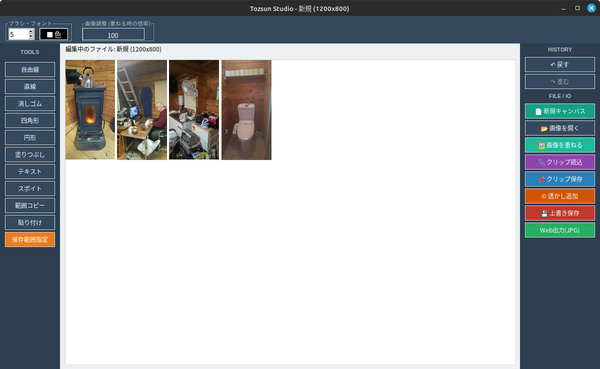 ホームページのタグの関係で、プログラム中の「<」「>」は全角表示しています。