#!/usr/bin/env python3
import tkinter as tk
from tkinter import messagebox, ttk
import math

# グラフ描画用ライブラリをインポート
try:
    import matplotlib.pyplot as plt
    from matplotlib.backends.backend_tkagg import FigureCanvasTkAgg
    import numpy as np
    HAS_MATPLOTLIB = True
except ImportError:
    HAS_MATPLOTLIB = False

class AdvancedCalculator:
    def __init__(self, root):
        self.root = root
        self.root.title("Python 高度関数電卓 Final")
        self.root.geometry("800x600")

        self.memory_value = 0.0
        self.mode_var = tk.StringVar(value="deg") # deg or rad
        self.history = []

        self.create_ui()
        self.setup_bindings()

    def create_ui(self):
        # メインレイアウト: 左側(計算機), 右側(履歴)
        main_frame = tk.Frame(self.root)
        main_frame.pack(fill=tk.BOTH, expand=True, padx=10, pady=10)

        left_frame = tk.Frame(main_frame)
        left_frame.pack(side=tk.LEFT, fill=tk.BOTH, expand=True)

        right_frame = tk.Frame(main_frame, width=200)
        right_frame.pack(side=tk.RIGHT, fill=tk.Y, padx=(10, 0))

        # --- 右側: 履歴表示 ---
        tk.Label(right_frame, text="計算履歴").pack(anchor=tk.W)
        self.history_listbox = tk.Listbox(right_frame, width=30, height=20)
        self.history_listbox.pack(side=tk.LEFT, fill=tk.BOTH, expand=True)
        scrollbar = tk.Scrollbar(right_frame, orient=tk.VERTICAL, command=self.history_listbox.yview)
        scrollbar.pack(side=tk.RIGHT, fill=tk.Y)
        self.history_listbox.config(yscrollcommand=scrollbar.set)

        # 履歴ダブルクリックで式を再利用
        self.history_listbox.bind('<Double-Button-1>', self.use_history)

        # グラフボタン (右側下部に追加)
        if HAS_MATPLOTLIB:
            tk.Button(right_frame, text="グラフ描画 (Plot)", command=self.open_plot_window, bg="#ddffdd").pack(fill=tk.X, pady=5)
        else:
            tk.Label(right_frame, text="※グラフ機能には\nmatplotlibとnumpyが必要", fg="red", font=("Arial", 8)).pack(pady=5)

        # --- 左側: 計算機UI ---

        # モード選択
        mode_frame = tk.Frame(left_frame)
        mode_frame.pack(fill=tk.X, pady=(0, 5))
        tk.Radiobutton(mode_frame, text="Deg (度)", variable=self.mode_var, value="deg").pack(side=tk.LEFT)
        tk.Radiobutton(mode_frame, text="Rad (ラジアン)", variable=self.mode_var, value="rad").pack(side=tk.LEFT, padx=10)

        # 入力ディスプレイ
        self.entry_var = tk.StringVar()
        self.entry = tk.Entry(left_frame, textvariable=self.entry_var, font=("Arial", 20), justify='right', bd=5, relief=tk.RIDGE)
        self.entry.pack(fill=tk.X, pady=(0, 10))
        self.entry.focus_set()

        # ボタン枠
        buttons_frame = tk.Frame(left_frame)
        buttons_frame.pack(fill=tk.BOTH, expand=True)

        # ボタン定義 (ラベル, 行, 列, コマンド(省略時はself.on_click))
        for i in range(5):
            buttons_frame.grid_columnconfigure(i, weight=1)

        # ボタンレイアウト定義
        # 行0: メモリ & クリア系
        btn_layout = [
            # Row 0
            ('MC', 0, 0, self.memory_clear), ('MR', 0, 1, self.memory_recall),
            ('M+', 0, 2, self.memory_add), ('M-', 0, 3, self.memory_sub), ('C', 0, 4, self.clear_all),

            # Row 1
            ('sin', 1, 0), ('cos', 1, 1), ('tan', 1, 2), ('DEL', 1, 3, self.backspace), ('AC', 1, 4, self.clear_all),

            # Row 2
            ('asin', 2, 0), ('acos', 2, 1), ('atan', 2, 2), ('x^2', 2, 3), ('sqrt', 2, 4),

            # Row 3
            ('sinh', 3, 0), ('cosh', 3, 1), ('tanh', 3, 2), ('x^3', 3, 3), ('1/x', 3, 4),

            # Row 4
            ('n!', 4, 0), ('(', 4, 1), (')', 4, 2), ('^', 4, 3), ('/', 4, 4),

            # Row 5
            ('log', 5, 0), ('7', 5, 1), ('8', 5, 2), ('9', 5, 3), ('*', 5, 4),

            # Row 6
            ('ln', 6, 0), ('4', 6, 1), ('5', 6, 2), ('6', 6, 3), ('-', 6, 4),

            # Row 7
            ('e', 7, 0), ('1', 7, 1), ('2', 7, 2), ('3', 7, 3), ('+', 7, 4),

            # Row 8
            ('pi', 8, 0), ('0', 8, 1), ('.', 8, 2), ('%', 8, 3), ('=', 8, 4, self.calculate_expression),

            # Row 9 (変数入力用)
            ('x', 9, 0, lambda: self.append_text('x')),
            ('y', 9, 1, lambda: self.append_text('y'))
        ]

        # GridのRow設定 (Row 0〜9 まで重みづけ)
        for i in range(10):
            buttons_frame.grid_rowconfigure(i, weight=1)

        for item in btn_layout:
            text = item[0]
            r = item[1]
            c = item[2]

            cmd = lambda t=text: self.append_text(t)
            if len(item) > 3:
                cmd = item[3]
            elif text in ['sin', 'cos', 'tan', 'asin', 'acos', 'atan', 'sinh', 'cosh', 'tanh', 'log', 'ln', 'sqrt']:
                cmd = lambda t=text: self.append_func(t)
            elif text == 'x^2':
                cmd = lambda: self.append_text('**2')
            elif text == 'x^3':
                cmd = lambda: self.append_text('**3')
            elif text == '1/x':
                cmd = self.inverse_number
            elif text == 'n!':
                cmd = lambda: self.append_func('fact')

            # 色分け
            bg_color = "#e0e0e0"
            if text in ['=', 'AC', 'C', 'MC']: bg_color = "#ffcccc"
            if text.isdigit() or text == '.': bg_color = "#ffffff"
            if text in ['+', '-', '*', '/', '^']: bg_color = "#ccddff"
            if text in ['x', 'y']: bg_color = "#ddffdd"  # x, yボタンの色

            btn = tk.Button(buttons_frame, text=text, font=("Arial", 11), bg=bg_color, command=cmd)
            btn.grid(row=r, column=c, sticky="nsew", padx=2, pady=2)


    def setup_bindings(self):
        self.root.bind('<Return>', lambda e: self.calculate_expression())
        self.root.bind('<Escape>', lambda e: self.clear_all())
        # Entryウィジェットにフォーカスがある時は、Entryの標準動作に任せる(二重削除防止)
        self.root.bind('<BackSpace>', lambda e: self.backspace() if e.widget != self.entry else None)

    def append_text(self, text):
        self.entry.insert(tk.INSERT, text)

    def append_func(self, func_name):
        self.entry.insert(tk.INSERT, f"{func_name}(")

    def inverse_number(self):
        # 現在の入力を ( ) で囲って 1/ を前につける、あるいは単純に末尾に追加
        # ここではシンプルに "1/(" を挿入する形にする
        self.entry.insert(tk.INSERT, "1/(")

    def backspace(self):
        # カーソル位置の文字を削除するように変更
        if self.entry.selection_present():
            self.entry.delete(tk.SEL_FIRST, tk.SEL_LAST)
        else:
            idx = self.entry.index(tk.INSERT)
            if idx > 0:
                self.entry.delete(idx-1, idx)

    def clear_all(self):
        self.entry.delete(0, tk.END)

    def memory_clear(self):
        self.memory_value = 0.0
        messagebox.showinfo("Memory", "メモリをクリアしました")

    def memory_recall(self):
        self.entry.insert(tk.INSERT, str(self.memory_value))

    def memory_add(self):
        try:
            val = self.safe_eval(self.entry.get())
            self.memory_value += float(val)
        except:
            pass # エラー時は無視

    def memory_sub(self):
        try:
            val = self.safe_eval(self.entry.get())
            self.memory_value -= float(val)
        except:
            pass # エラー時は無視

    def use_history(self, event):
        # 履歴をクリックしたらその結果を入力欄に追記(あるいは置換)
        # ここでは末尾に追記する
        selection = self.history_listbox.curselection()
        if selection:
            item = self.history_listbox.get(selection[0])
            # "式 = 結果" の形式なので、結果部分だけ取り出す、あるいは式全体を使う?
            # 簡易的に "=" の右側(結果)を取得して入力する
            if "=" in item:
                _, result = item.rsplit("=", 1)
                self.entry.insert(tk.INSERT, result.strip())

    def safe_eval(self, expression, x_val=None, y_val=None):
        # セキュリティ対策済みのeval実行
        # x_valが指定されていれば、変数xとして使用する
        expr = expression.replace('^', '**')

        is_deg = self.mode_var.get() == "deg"

        # numpyが使える場合はnumpy関数を使用するように変更するとグラフ描画が高速化するが、
        # 通常の計算と共通化するためmathを使う(plot時はx_valの型を見て分岐も可能だがシンプルに)
        # ただしプロット時はx_valはnumpy arrayであることが多い。
        # numpy arrayに対してmath関数は使えないので、numpy関数を使う必要がある。

        use_numpy = False
        if HAS_MATPLOTLIB and ((x_val is not None and isinstance(x_val, np.ndarray)) or
                               (y_val is not None and isinstance(y_val, np.ndarray))):
            use_numpy = True
            m = np
        else:
            m = math

        # Math関数ラップ (numpy対応)
        if use_numpy:
            # numpyの場合はdeg/rad変換は引数側で行うか、関数側で行うか
            # numpyの三角関数はラジアン入力。
            def _sin(x): return m.sin(m.radians(x)) if is_deg else m.sin(x)
            def _cos(x): return m.cos(m.radians(x)) if is_deg else m.cos(x)
            def _tan(x): return m.tan(m.radians(x)) if is_deg else m.tan(x)

            def _asin(x):
                val = m.arcsin(x)
                return m.degrees(val) if is_deg else val
            def _acos(x):
                val = m.arccos(x)
                return m.degrees(val) if is_deg else val
            def _atan(x):
                val = m.arctan(x)
                return m.degrees(val) if is_deg else val

            context_fns = {
                'sin': _sin, 'cos': _cos, 'tan': _tan,
                'asin': _asin, 'acos': _acos, 'atan': _atan,
                'sinh': m.sinh, 'cosh': m.cosh, 'tanh': m.tanh,
                'log': m.log10, 'ln': m.log,
                'sqrt': m.sqrt,
                'pi': m.pi, 'e': m.e,
                'abs': m.abs
                # fact (階乗) はnumpy arrayには直接適用しにくいので割愛または別途対応が必要だが今回は簡易実装
            }
        else:
            # scalar (math)
            def _sin(x): return m.sin(m.radians(x)) if is_deg else m.sin(x)
            def _cos(x): return m.cos(m.radians(x)) if is_deg else m.cos(x)
            def _tan(x): return m.tan(m.radians(x)) if is_deg else m.tan(x)

            def _asin(x): return m.degrees(m.asin(x)) if is_deg else m.asin(x)
            def _acos(x): return m.degrees(m.acos(x)) if is_deg else m.acos(x)
            def _atan(x): return m.degrees(m.atan(x)) if is_deg else m.atan(x)

            context_fns = {
                'sin': _sin, 'cos': _cos, 'tan': _tan,
                'asin': _asin, 'acos': _acos, 'atan': _atan,
                'sinh': m.sinh, 'cosh': m.cosh, 'tanh': m.tanh,
                'log': m.log10, 'ln': m.log,
                'sqrt': m.sqrt,
                'fact': m.factorial,
                'pi': m.pi, 'e': m.e,
                'abs': abs
            }

        context = {k: v for k, v in math.__dict__.items() if not k.startswith("__")}
        context.update({"__builtins__": None})
        context.update(context_fns)

        if x_val is not None:
            context['x'] = x_val
        if y_val is not None:
            context['y'] = y_val

        return eval(expr, context)

    def calculate_expression(self):
        expr = self.entry.get()
        if not expr: return

        try:
            # x、yが含まれている場合はエラーになるのでチェック
            if 'x' in expr or 'y' in expr:
                 messagebox.showinfo("Info", "変数 x または y が含まれています。\nグラフを描画ボタンを押してください。")
                 return

            result = self.safe_eval(expr)

            # 結果を表示
            self.entry.delete(0, tk.END)
            self.entry.insert(tk.END, str(result))

            # 履歴に追加
            history_item = f"{expr} = {result}"
            self.history.append(history_item)
            self.history_listbox.insert(tk.END, history_item)
            self.history_listbox.see(tk.END)

        except Exception as e:
            messagebox.showerror("Error", f"計算できません: {e}")


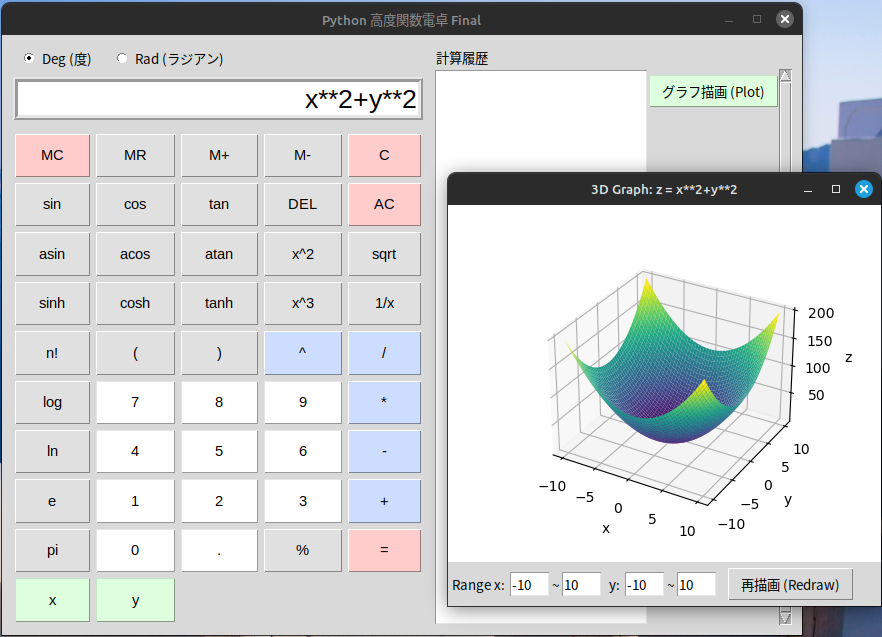
    def open_plot_window(self):
        if not HAS_MATPLOTLIB:
            messagebox.showerror("Error", "matplotlib がインストールされていません。\npip install matplotlib numpy を実行してください。")
            return

        expr = self.entry.get()
        if not expr:
            messagebox.showwarning("Warning", "式を入力してください (例: x**2, sin(x))")
            return

        # 変数yが含まれているかチェック (3Dモード判定)
        is_3d = 'y' in expr

        # 別ウィンドウ作成
        plot_window = tk.Toplevel(self.root)
        if is_3d:
            plot_window.title(f"3D Graph: z = {expr}")
            plot_window.geometry("800x600")
        else:
            plot_window.title(f"Graph: y = {expr}")
            plot_window.geometry("600x500")

        # 設定フレーム
        control_frame = tk.Frame(plot_window)
        control_frame.pack(fill=tk.X, side=tk.BOTTOM, pady=5)

        tk.Label(control_frame, text="Range x:").pack(side=tk.LEFT, padx=2)
        x_min_entry = tk.Entry(control_frame, width=5)
        x_min_entry.insert(0, "-10")
        x_min_entry.pack(side=tk.LEFT)

        tk.Label(control_frame, text="~").pack(side=tk.LEFT)
        x_max_entry = tk.Entry(control_frame, width=5)
        x_max_entry.insert(0, "10")
        x_max_entry.pack(side=tk.LEFT)

        y_min_entry = None
        y_max_entry = None

        if is_3d:
            tk.Label(control_frame, text=" y:").pack(side=tk.LEFT, padx=2)
            y_min_entry = tk.Entry(control_frame, width=5)
            y_min_entry.insert(0, "-10")
            y_min_entry.pack(side=tk.LEFT)

            tk.Label(control_frame, text="~").pack(side=tk.LEFT)
            y_max_entry = tk.Entry(control_frame, width=5)
            y_max_entry.insert(0, "10")
            y_max_entry.pack(side=tk.LEFT)

        # matplotlib 埋め込み
        fig = plt.figure(figsize=(5, 4))

        if is_3d:
            try:
                from mpl_toolkits.mplot3d import Axes3D
                ax = fig.add_subplot(111, projection='3d')
            except ImportError:
                messagebox.showerror("Error", "3D描画機能(mpl_toolkits.mplot3d)が読み込めません。")
                return
        else:
            ax = fig.add_subplot(111)

        canvas = FigureCanvasTkAgg(fig, master=plot_window)
        canvas.get_tk_widget().pack(fill=tk.BOTH, expand=True)

        # 描画関数
        def draw():
            try:
                ax.clear()

                xmin = float(x_min_entry.get())
                xmax = float(x_max_entry.get())

                if is_3d:
                    ymin = float(y_min_entry.get())
                    ymax = float(y_max_entry.get())

                    # 3D Data
                    # 高速化のため解像度は適度に (50x50程度)
                    x_vals = np.linspace(xmin, xmax, 50)
                    y_vals = np.linspace(ymin, ymax, 50)
                    X, Y = np.meshgrid(x_vals, y_vals)

                    try:
                        Z = self.safe_eval(expr, x_val=X, y_val=Y)
                    except Exception as e:
                        # 定数関数の場合などのフォールバック
                        try:
                            const_val = self.safe_eval(expr)
                            Z = np.full_like(X, const_val)
                        except:
                            raise e

                    # 3D Plot
                    ax.plot_surface(X, Y, Z, cmap='viridis', edgecolor='none')
                    ax.set_xlabel("x")
                    ax.set_ylabel("y")
                    ax.set_zlabel("z")

                else:
                    # 2D Data
                    x_vals = np.linspace(xmin, xmax, 400)
                    try:
                        y_vals = self.safe_eval(expr, x_val=x_vals)
                    except Exception as e:
                        try:
                            const_val = self.safe_eval(expr)
                            y_vals = np.full_like(x_vals, const_val)
                        except:
                            messagebox.showerror("Plot Error", f"数式の評価に失敗しました:\n{e}")
                            return

                    # 2D Plot
                    ax.plot(x_vals, y_vals, label=f"y={expr}")
                    ax.grid(True)
                    ax.axhline(0, color='black', linewidth=0.5)
                    ax.axvline(0, color='black', linewidth=0.5)
                    ax.set_xlabel("x")
                    ax.set_ylabel("y")
                    ax.legend()

                canvas.draw()

            except Exception as e:
                messagebox.showerror("Error", str(e))

        def save_plot():
            from tkinter import filedialog
            file_path = filedialog.asksaveasfilename(
                defaultextension=".png",
                filetypes=[("PNG Image", "*.png"), ("JPEG Image", "*.jpg;*.jpeg"), ("All Files", "*.*")],
                title="グラフ画像の保存"
            )
            if file_path:
                try:
                    fig.savefig(file_path)
                    messagebox.showinfo("保存完了", f"グラフを保存しました:\n{file_path}")
                except Exception as e:
                    messagebox.showerror("保存エラー", f"保存に失敗しました:\n{e}")

        btn_draw = tk.Button(control_frame, text="再描画 (Redraw)", command=draw)
        btn_draw.pack(side=tk.LEFT, padx=10)
        btn_save = tk.Button(control_frame, text="グラフ保存 (Save)", command=save_plot)
        btn_save.pack(side=tk.LEFT, padx=10)

        # 初回描画
        draw()

if __name__ == "__main__":
    root = tk.Tk()
    app = AdvancedCalculator(root)
    root.mainloop()
|
 ホームページのタグの関係で、プログラム中の「<」「>」は全角表示しています。